Here are the steps to register your website or blog with Adsterra so you can obtain ad codes:
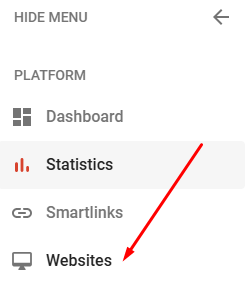
- Click the Websites menu on the left side of the screen:
- Then press the Add Website button (green) on the right,

- After that, a form will appear for entering the website address you wish to register:
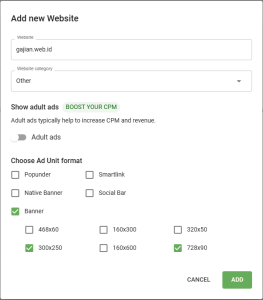
- Enter the website or blog address, then select the website category—I usually choose “Other.” Next, select the ad format for which you want to generate the code; I typically use the 720×90 and 300×250 banner formats. Once finished, click the “ADD” button.
- Wait between 1 and 3 minutes, then—while still on the same page (Websites)—press the F5 key to refresh the page. If the website or blog you registered is active, the display will look like the image below:
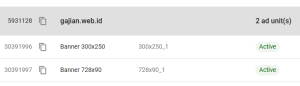
- This means we can now use the ad code to insert it into our website or blog.
- To get the ad code, simply click the “Get Code” button located next to the ad format, and the code will appear.
Leave a Reply